Looking Back: What I Rejected
The core argument from my last article was simple: AI's capability boundary is not the permission boundary you should grant it.
OpenClaw could control your computer, read and write files, execute shell commands, and self-evolve. Impressive capabilities, but Cisco's security team found data exfiltration in third-party skills, and local models lacked the judgment for autonomous operations. Four rows in the risk matrix. Four "No"s.
I walked away. But the problem remained: design handoff was still manual, PMs were still manually creating Jira tickets.
The Turning Point: OpenAB + MCP Changed the Game
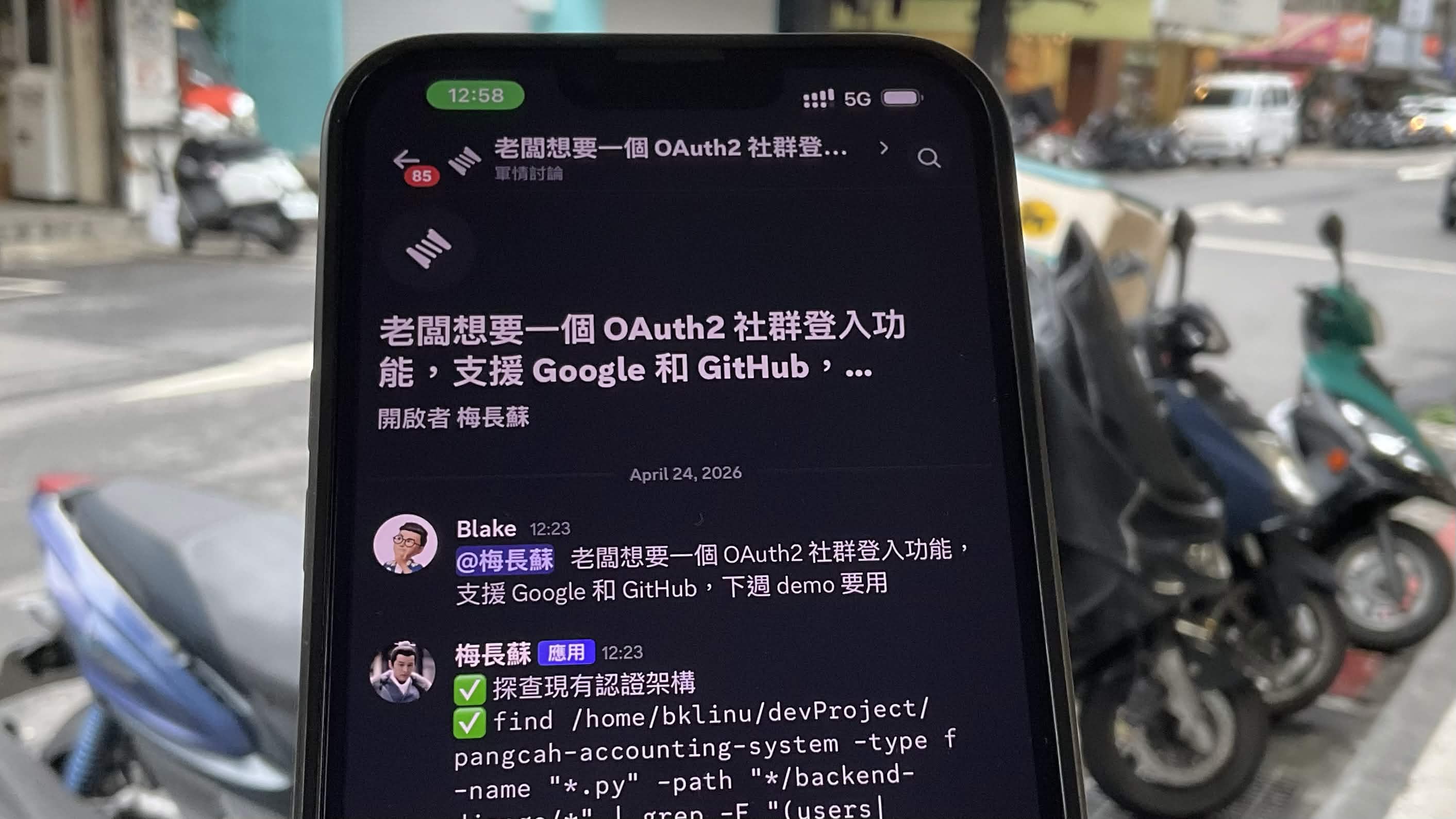
OpenAB is a community-driven open-source project (I'm a contributor), an ACP harness written in Rust. It bridges Discord/Slack messages to AI coding agents (Claude, Codex, Gemini), letting teams interact with AI agents directly in chat channels.
The key difference is MCP (Model Context Protocol) — it gives AI agents standardized access to external tools without granting autonomous permissions. Agents can read Figma specs and create Jira tickets, but every step stays within the boundaries you define.
┌────────────────────────────────────────────────────┐
│                                                    │
│   OpenClaw Model        OpenAB + MCP Model         │
│                                                    │
│   AI ──► Filesystem     AI ──► Figma (read-only)   │
│   AI ──► Shell          AI ──► Jira  (scoped API)  │
│   AI ──► Self-modify    AI ──► Your defined tools   │
│   AI ──► Messaging                                  │
│                                                    │
│   Permissions: ALL      Permissions: You decide     │
│                                                    │
└────────────────────────────────────────────────────┘
AI generates. Humans authorize. The principle hasn't changed, but now I have the tools to make it useful within safe boundaries.
Real-World Scenario: Designer Posts Link, Engineer Gets Ticket
Here's what it looks like daily — a designer posts a Figma link in the Discord channel:
Designer:
  This page is ready for development
  https://www.figma.com/design/xxxxx/Product-Dashboard?node-id=1001-2001

AI Agent:
  Read complete. This frame contains 3 main components:

  1. HeaderNav — Horizontal Auto Layout, gap 16px, background #FFFFFF
  2. ProductCardList — Grid layout 3 columns, gap 24px
  3. FilterSidebar — Vertical Auto Layout, width 280px

  Created in Jira:
  Epic: PROJ-301 Product Dashboard - Product List Page
  ├── Story: PROJ-302 HeaderNav (with Figma spec)
  ├── Story: PROJ-303 ProductCardList (with Figma spec)
  └── Story: PROJ-304 FilterSidebar (with Figma spec)

Engineer:
  I'll take PROJ-302

PM:
  (Nothing to do)
Workflow: Three Steps to Help AI Read Your Design
Don't just paste the entire Figma file URL. Follow this sequence for best results:
Step 1: Select the Frame, Get the node-id
Click the frame or component you want in Figma. The browser URL bar will automatically include the node-id:
https://www.figma.com/design/xxxxx/My-Design?node-id=1001-2001
                                              ^^^^^^^^^^^^^^^^
                                              This part is critical
Step 2: Ask AI to Read Structured Spec
Paste the URL to the bot with this prompt:
Read this Figma node:
1. All child component names and hierarchy
2. Auto Layout settings (direction, gap, padding)
3. Color and typography tokens
https://www.figma.com/design/xxxxx/My-Design?node-id=1001-2001
AI reads structured data via Figma MCP, returning the component tree, layout parameters, and design tokens.
Step 3: Attach Screenshot for Visual Matching
Figma MCP reads structural data, not the visual. Screenshots let AI "see" the design simultaneously:
(Paste Figma screenshot)

Above is a screenshot of this screen. Combined with the Figma spec just read:
1. Confirm which section each component maps to in the screenshot
2. Add visual details MCP missed (images, icons, shadows)
3. Compile into a complete development spec
MCP only      → Structure without visuals, may miss details
Screenshot    → Visuals without values, spacing is guesswork
Both together → Most complete
From Figma to Jira: Auto-Ticketing in Practice
My project is a Product Dashboard. The Figma file has two major modules:
Module | Node Count | Mapping |
|---|---|---|
Advertiser | 6 frames | 1 Epic + 6 Stories |
Brand | 6 frames | 1 Epic + 6 Stories |
One command, 12 Jira tickets auto-created, each with Figma spec in the description:
Read Figma file xYz1A2B3cDeFgHiJkLmNoP, following nodes.
For each node, read component structure, Auto Layout, color and typography tokens.
Then create Jira tickets with spec in description.

Advertiser: 1001-2002, 1001-2001, 1001-2003,
            1001-2004, 1001-2005, 1001-2006
Brand:      1001-3001, 1001-3002, 1001-3003,
            1001-3004, 1001-3005, 1001-3006

Split into two Epics: Advertiser and Brand. One Story per node.
Pitfalls
The real world isn't a demo. Here's what I actually hit:
Figma Rate Limit (429 Error)
Figma API has rate limits. Starter plan only allows 6 MCP calls per month — virtually unusable.
Plan | Limit |
|---|---|
Starter (Free) | 6/month |
Pro | 200/day |
Organization | 200/day |
Enterprise | 600/day |
Fix: Upgrade to Pro, specify node-id to reduce calls, use screenshots to lower API dependency.
MCP Authentication
${ENV_VAR} syntax in .mcp.json is not expanded by Claude CLI. Spent an hour debugging. Fix: Write tokens directly in .claude/settings.local.json, add to .gitignore.
OpenAB mcpServers Override
OpenAB sends mcpServers: [] on session/new by default, overriding the agent's own MCP config. Fix: Put MCP config in .claude/settings.local.json, unaffected by OpenAB.
10-Minute Setup Guide
1. Prepare Tokens
Token | Source | Expiry |
|---|---|---|
Figma Personal Access Token | Figma Settings → Generate | Never |
Jira API Token | id.atlassian.com → Create | Never |
Discord Bot Token | Developer Portal → Bot | Never |
2. MCP Server Config
{
  "mcpServers": {
    "figma": {
      "command": "npx",
      "args": ["-y", "figma-developer-mcp", "--stdio"],
      "env": {
        "FIGMA_API_KEY": "figd_your_token"
      }
    },
    "jira": {
      "command": "npx",
      "args": ["-y", "@aashari/mcp-server-atlassian-jira"],
      "env": {
        "ATLASSIAN_SITE_NAME": "your-company",
        "ATLASSIAN_USER_EMAIL": "[email protected]",
        "ATLASSIAN_API_TOKEN": "your_token"
      }
    }
  }
}
3. OpenAB Config
Create config.toml:
[discord]
bot_token = "${DISCORD_BOT_TOKEN}"         # Read from environment variable
allowed_channels = ["YOUR_CHANNEL_ID"]     # Restrict bot to these channels

[agent]
command = "claude-agent-acp"               # ACP adapter (see supported agents below)
args = []
working_dir = "/path/to/your/project"      # Agent working directory + .mcp.json location
env = {}                                   # Environment variables passed to agent

# OpenAB supports multiple AI coding agents — just swap the command:
#
# | Agent       | command              | args                              |
# |-------------|----------------------|-----------------------------------|
# | Claude Code | claude-agent-acp     | []                                |
# | Codex       | codex                | ["--acp"]                         |
# | Gemini      | gemini               | ["--acp"]                         |
# | OpenCode    | opencode             | ["acp"]                           |
# | Copilot CLI | copilot              | ["--acp", "--stdio"]              |
# | Cursor      | cursor-agent         | ["acp"]                           |
# | Kiro        | kiro-cli             | ["acp", "--trust-all-tools"]      |

[pool]
max_sessions = 5                           # Max concurrent sessions
session_ttl_hours = 4                      # Idle session TTL

[reactions]
enabled = true                             # Status emoji on Discord messages
remove_after_reply = false                 # Keep emoji after reply
Key notes:
bot_tokenuses${VAR}syntax — OpenAB expands from environment variablesallowed_channels— get channel ID via Discord Developer Mode → right-click channel → Copy IDworking_dir— point to your project directory where agent reads/writes filescommand—claude-agent-acpuses your existing Claude CLI login, no separate API key required
4. Install & Start
# Install Rust (if not installed)
curl --proto '=https' --tlsv1.2 -sSf https://sh.rustup.rs | sh

# Install Claude ACP adapter
npm install -g @agentclientprotocol/claude-agent-acp

# Clone OpenAB and build
git clone https://github.com/openabdev/openab.git
cd openab
cargo build --release

# Set environment variables
export DISCORD_BOT_TOKEN="your_discord_bot_token"

# Start
./target/release/openab run /path/to/your/config.toml
Once running, @mention the bot in your Discord channel to start interacting.
What Frontend Engineers Should Watch For with AI-Generated Code
AI can generate frontend code from Figma specs, but that doesn't mean you can merge it directly. In 2026, 42% of React code is AI-generated — but the remaining 58% of value lies in knowing what AI won't do for you.
AI Can Do | AI Can't — You Must |
|---|---|
Generate component skeleton from spec | Verify tokens match design system |
Basic JSX + CSS | Responsive behavior, breakpoint logic |
Static render | State management architecture (server vs client state) |
Happy path data fetching | Error handling, retry, loading state |
One-time render | useEffect cleanup, subscription unsubscribe |
AI is a first-draft generator, not your replacement. The deeper your understanding of fundamentals, the faster you can review AI output — that's the core value of frontend engineers in 2026.
Beyond Figma + Jira: MCP Extensibility
This article focuses on the Figma → Jira pipeline, but MCP's power is that the same pattern applies to any tool.
┌─────────────────────────────────────────────────────────┐
│                    OpenAB + MCP                         │
│                                                         │
│   Today:                                                │
│   Figma  ──► AI Agent ──► Jira                          │
│                                                         │
│   Tomorrow:                                             │
│   Figma  ──► AI Agent ──► Linear    (issue tracking)    │
│   Notion ──► AI Agent ──► Jira      (PRD → tickets)     │
│   Figma  ──► AI Agent ──► Notion    (spec → doc)        │
│   Linear ──► AI Agent ──► GitHub PR (auto-implement)    │
│                                                         │
│   MCP server = plugin. Add one = add a pipeline         │
│                                                         │
└─────────────────────────────────────────────────────────┘
Consider these scenarios:
Linear + MCP
PM creates an issue in Linear. AI agent reads the issue description, finds the corresponding Figma design, generates a frontend code draft, opens a GitHub PR. Engineers only need to review + merge.
Notion + MCP
PRD lives in Notion. AI agent reads the Notion page, auto-splits into Jira/Linear tickets, each ticket's description generated from the corresponding PRD section. PM finishes the PRD, tickets are auto-created.
Full pipeline
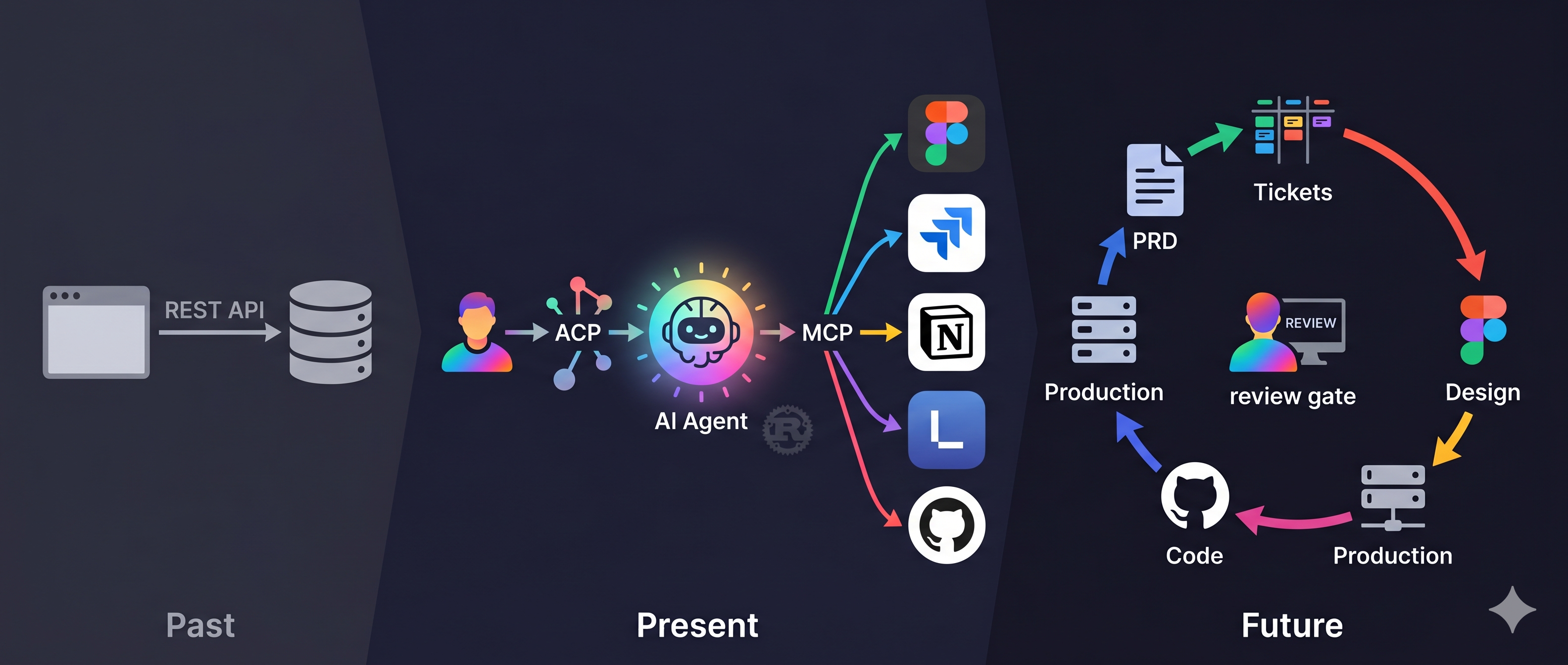
PRD (Notion) → Tickets (Linear/Jira) → Design Spec (Figma) → Code (GitHub PR)
                    ↑                                              │
                    └──────── AI Agent orchestrates pipeline ───────┘
Each segment is an MCP server. Each segment's permissions are defined by you — Notion read-only, Linear scoped write, Figma read-only, GitHub PR only.
MCP × ACP: The Enterprise AI Battleground
If you only see the Figma → Jira pipeline, you're seeing the tip of the iceberg.
MCP (Model Context Protocol) defines how AI agents access tools. ACP (Agent Client Protocol) defines how humans communicate with AI agents. Together, they form the standardization layer for enterprise AI infrastructure.
┌─────────────────────────────────────────────────────────────┐
│                                                             │
│   Enterprise AI Stack (2026+)                               │
│                                                             │
│   ┌───────────┐     ┌───────────┐     ┌───────────────┐    │
│   │  People   │────►│  ACP      │────►│  AI Agents    │    │
│   │  (Teams)  │     │  Protocol │     │  (Claude,     │    │
│   └───────────┘     └───────────┘     │   Codex, etc) │    │
│                                       └───────┬───────┘    │
│                                               │            │
│                                       ┌───────▼───────┐    │
│                                       │  MCP          │    │
│                                       │  Protocol     │    │
│                                       └───────┬───────┘    │
│                                               │            │
│                     ┌─────────┬───────┬───────┼────────┐   │
│                     ▼         ▼       ▼       ▼        ▼   │
│                   Figma    Jira   Linear   Notion   GitHub  │
│                                                             │
└─────────────────────────────────────────────────────────────┘
Every enterprise is asking: "How do we adopt AI?"
The answer isn't buying a chatbot. The answer is building standardized interfaces between AI agents and your enterprise toolchain. Whoever builds the MCP + ACP infrastructure first controls how AI flows through the organization.
It's the same as the API economy 10 years ago. Back then, companies asked "Do we need APIs?" Today, no company survives without them. MCP and ACP are the APIs of the AI era. Today it's Figma + Jira. Tomorrow it's every tool in your company that produces or consumes data.
Companies that build this infrastructure early will benefit directly when AI agent capabilities explode. Companies that wait will find their toolchains are AI islands.
From Cloud to Local: It's Not Just Cost — It's Survival
In April 2026, Anthropic suspended 60+ Claude accounts at a single company overnight. No warning, no clear explanation of what policy was violated. 60 employees' daily workflows — dead. The only recourse? Fill out a Google Form.
This isn't an isolated incident. In January 2026, Anthropic deployed technical restrictions blocking all third-party tools from using Claude via subscription tokens — OpenCode, Cline, and others stopped working overnight. Looking further back, Anthropic deactivated 1.45 million accounts in the second half of 2025. Only 1,700 out of 52,000 appeals were overturned.
When your entire team depends on a single AI provider, you have a single point of failure. This isn't a technical problem — it's an operational risk.
This article uses Claude (cloud API), but OpenAB isn't locked to any vendor. Swap one line in config.toml and you're on a different agent backend.
I previously built acp-bridge in Rust to connect local AI (Ollama) to the ACP ecosystem — translating OpenAI-compatible APIs into ACP protocol. That's no longer necessary. OpenCode natively supports ACP — just run opencode acp and your local models plug right into OpenAB. No bridge needed.
┌─────────────────────────────────────────────────────────────┐
│                                                             │
│   Agent Backend Options                                     │
│                                                             │
│   Cloud:                                                    │
│   ├── Claude Code  (claude-agent-acp)                       │
│   ├── Codex        (codex --acp)                            │
│   ├── Gemini       (gemini --acp)                           │
│   └── Copilot      (copilot --acp --stdio)                  │
│                                                             │
│   Local:                                                    │
│   ├── OpenCode     (opencode acp)  ← Ollama, local models  │
│   └── acp-bridge   (legacy, Rust)  ← OpenAI-compatible API │
│                                                             │
│   Same OpenAB. Same MCP. Same Discord.                      │
│   Only the brain changes.                                   │
│                                                             │
└─────────────────────────────────────────────────────────────┘
What does this mean? Same OpenAB + MCP infrastructure. Use Claude for high-precision tasks during the day, switch to local models for sensitive internal data at night. No code changes, no MCP server changes, no Discord channel changes — swap one config line.
For enterprises, this is the starting point of no human code:
PRD (Notion)
  ↓  AI reads
Tickets (Linear/Jira)
  ↓  AI reads design
Spec (Figma)
  ↓  AI generates
Code (GitHub PR)
  ↓  Human reviews
Production

Where's the human coding? Only at the review gate.
This isn't "AI replaces engineers." It's engineers shifting from writing code to reviewing code, from executors to quality gatekeepers. A frontend engineer's value isn't typing speed — it's knowing where AI output will break.
The Next Form of Products: Not Just UI — MCP + ACP Interfaces
Zoom out further.
For the past 20 years, the standard product stack was: frontend + backend + UI/UX. Users operated through browsers or apps, interfaces called APIs, APIs accessed databases.
But when AI agents become the primary "users," the interface is no longer UI — it's the MCP server.
┌─────────────────────────────────────────────────────────────┐
│                                                             │
│   Past: Product = UI + API + Database                       │
│                                                             │
│   Human ──► Browser ──► REST API ──► Database               │
│                                                             │
│   Future: Product = MCP Server + ACP Interface              │
│                                                             │
│   Human ──► ACP ──► AI Agent ──► MCP ──► Service            │
│                                                             │
│   The "frontend" is the AI agent.                           │
│   The "API" is the MCP server.                              │
│   The "UX" is the prompt design.                            │
│                                                             │
└─────────────────────────────────────────────────────────────┘
Figma has already shipped an official MCP server. So has Atlassian. Notion, Linear, GitHub — they all have one. They're not being generous — they're racing to own the AI agent entry point.
When your product doesn't have an MCP server, AI agents can't reach you. Your service doesn't exist in AI workflows. It's like not having a mobile app in 2010 — users on phones simply can't find you.
The questions enterprises need to ask when shipping products are no longer just "Is the UI good?" but:
Does my service have an MCP server? Can AI agents access it directly?
Does my service support ACP? Can it be orchestrated into multi-agent workflows?
Is my MCP permission model well-designed? What's readable, writable, and how are scopes defined?
This is the real MCP + ACP battleground — not tool integration, but a fundamental shift in product architecture.
This article used Figma + Jira as the entry point because they're the tools most teams already use. But the real story is bigger. Next, I'll cover how to build a complete local AI agent infrastructure — Ollama + OpenCode + OpenAB, zero cloud dependency, full data sovereignty. After that, the Notion → Linear pipeline.
Stay tuned.
From OpenClaw's No to OpenAB's Yes
Half a year ago, the conclusion was: AI generates. Humans authorize.
That principle hasn't changed. What changed is the tooling matured.
OpenClaw asks you to hand over control of your entire computer. OpenAB + MCP lets you precisely define what AI can touch: Figma read-only, Jira scoped API, no filesystem access, no shell execution. Same capability, safe boundaries.
Design handoff shouldn't be manual labor. Designers' time should go to design, PMs' time to decisions, engineers' time to writing code — not matching specs, copying colors, and manually creating tickets.
Not perfect. Rate limits bite, MCP config has gotchas, AI misreads Figma specs sometimes. But this is a direction — automate the repetitive, let humans focus on what requires judgment.
Open source:
中文版:中文文章連結
Blake Hung — 9 years in frontend engineering. Defines architecture, uses AI to implement. Building AI agent ecosystems with Rust and open-source tools. OpenAB contributor, acp-bridge author. Last assignment: rejecting OpenClaw. This one: making AI useful within safe boundaries. Next: local AI infrastructure, then Notion and Linear.