Intro: The Distance Between Two Worlds
Yesterday, when AMD CEO Lisa Su proclaimed at CES 2026 that "AI belongs at the edge," I turned my head to look at the behemoth humming with a low-frequency roar at my feet.
The future she described is elegant: Strix Halo, Unified Memory, high integration.
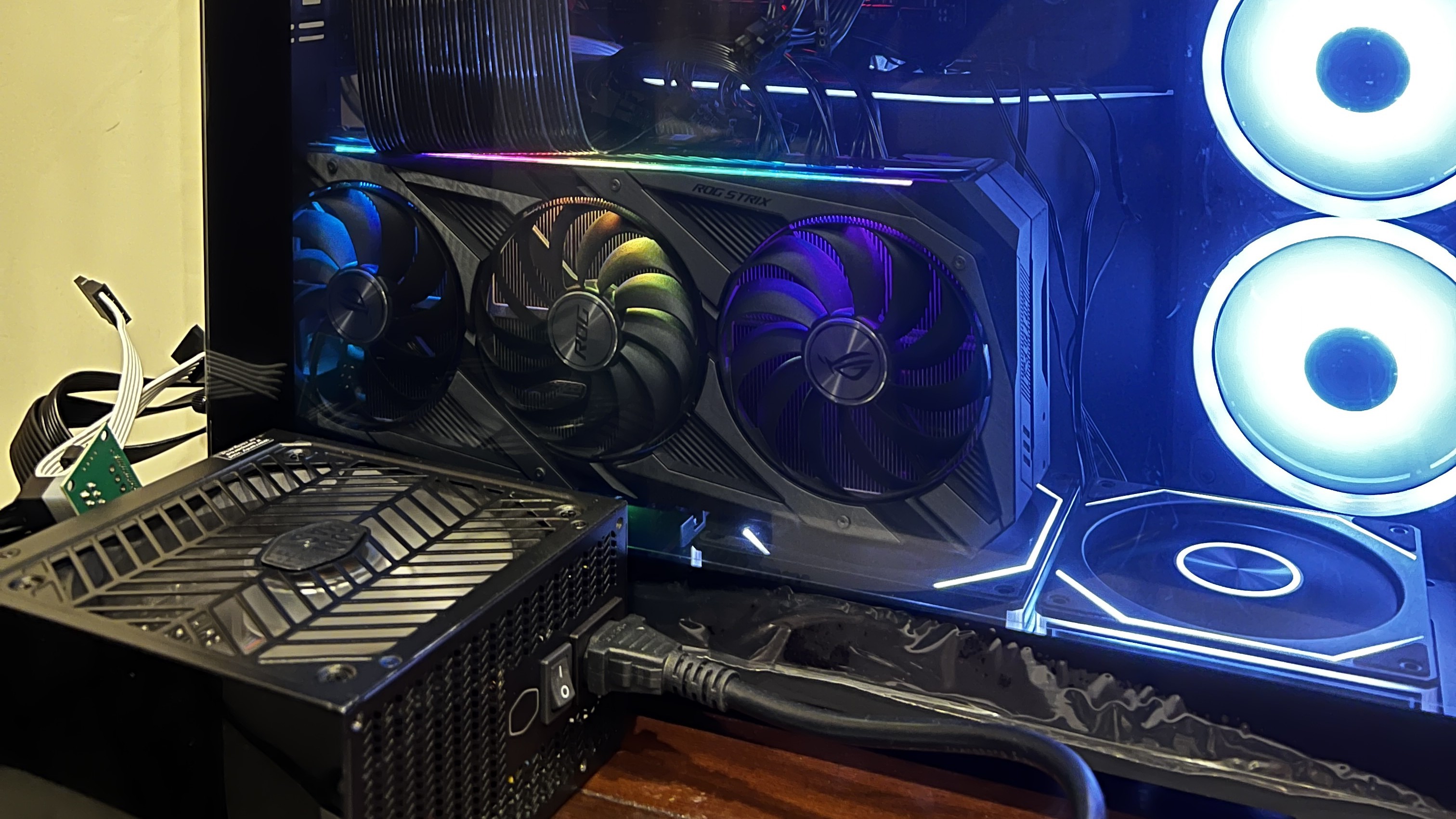
My reality is violent: Two power supply units (one hanging outside the case), synchronized by a SATA-to-ATX trigger card bought on Taobao to jumpstart their "heartbeat," driving two RTX 3090s from different brands. The interior of the case is scarred with modifications from a power drill, with power cables snake in through gaps like a life-support system plugged into an external organ.

Chapter 1: The Past and Present of Z370 — From Isolation to AI Forge
The foundation of this machine is a GIGABYTE Z370 motherboard from the 2017 era. It isn't just e-waste; it is a witness to my career as a developer.
As an engineer who has long used a Mac for development (9 years Frontend/IoT experience), I often faced a pain point: client-side applications that only supported Windows. To keep my work MacBook Pro environment from becoming cluttered and bloated, I assembled this computer in August 2023 specifically to isolate Windows testing requirements.
A spare machine for a specific purpose doesn't need to be high-end. Z370 + i7-8700K + 16GB RAM was enough.
Years passed, and this machine, born for "environment isolation," gathered dust in the corner of my study until December 2025. When I started conceptualizing the Geo Decision Matrix project and realized I needed 48GB of VRAM, I suddenly remembered it.
Why not modify it? It’s sitting idle anyway.
And so, it was given a new mission: to shoulder the matrix operations for full-scale geographic data. It transformed from a Windows client test machine into a Linux AI Server. Dug out from the dust, fitted with two GPU kings, modified with a drill, and wired up—it burned once again.
Chapter 2: Hardware Unveiled — Violent Displacement, Drills, and an "External Heart"
To cobble together 48GB of VRAM, I scoured the secondhand market in December 2025 for two cards:
Main Card: EVGA RTX 3090 FTW3 ULTRA (Rated 350W)
Secondary Card: ASUS ROG STRIX RTX 3090 GAMING OC (Rated 350W)
To handle the transient power spikes (where the combined load exceeds 1000W), I decided on a "Dual PSU" strategy: A Cooler Master MWE 1050W for the main system, and a Cooler Master XG 850 exclusively for the secondary card.
The Physical Nightmare: The External Power Supply
But here, I encountered a fatal physical problem.
The ROG STRIX RTX 3090 is simply too fat. When I plugged it into PCIe Slot 2 and tilted it slightly for airflow, it directly occupied the space in the Phanteks case originally allocated for the second power supply.
The MWE 1050W had already taken one spot. Where would the XG 850 go?
The answer: Hanging outside the case.
The main power supply stayed peacefully inside; the secondary XG 850 was "piggybacked" on the front of the chassis using a wire rack. Power cables were fed through the ventilation gaps, making the rig look like a patient on ECMO (Extracorporeal Membrane Oxygenation).
Drills and Standoffs: When the Riser Doesn't Fit
What if, besides having no room for power, you can't even lock the graphics card in place?
To fit that massive ASUS card into the bottom power supply bay, I had to use a GPU riser cable for vertical installation. But tragedy struck: the GPU riser cable I had on hand didn't match the mounting holes on the case's vertical bracket—the cable's mounting points were too short to reach the screw holes.
A normal engineer would buy a compatible cable. I didn't.
I took out a power drill.
I measured the hole spacing on the riser cable and drilled new holes directly into the steel bracket of the case. Then, I took hexagonal motherboard standoffs, screwed them into the freshly drilled holes, and brute-forced a brand-new, sturdy mounting point.
The moment I tightened the screws, I realized this was no longer just PC assembly; this was Case Modding.
Taobao Wisdom: The SATA Sync Trigger
Finally, how do you make that "stray" power supply outside the case switch on and off in sync with the main system?
I found a SATA-to-ATX starter card on Taobao for a few RMB.
The principle is simple and violent:
Connect a SATA cable from the main PSU to this adapter card.
When the host powers on, the SATA power triggers a relay on the card.
The relay closes, waking up the secondary PSU via its 24-pin connector.
The moment I pressed the switch, the EVGA inside, the ASUS outside, and the bracket forced into place by a drill all roared to life simultaneously. Simple, cheap, and full of hacker spirit.
[📸 Insert Image 3: Close up of the SATA trigger card]
Chapter 3: Hitting the Wall — When Docker Meets NCCL Error
The hardware lit up, but that didn't mean the software worked.
My goal was clear: Use RAPIDS Dask to launch distributed computing and run K-Means across both cards in parallel. Theoretically, this should approach 2x speed.
But I spent a whole week getting nothing but a single line of text in the terminal:

The First Wall: Bandwidth Asymmetry
This is the "Price of Local Compute."
In the cloud, you have NVLink (900 GB/s). On the ground, I only have Z370's PCIe 3.0 x16.
The theoretical bandwidth is 32 GB/s, but in P2P (Peer-to-Peer) communication, real-world tests showed only 12-15 GB/s. Because of the Z370's PCIe topology, all GPU communication must pass through the Memory Controller Hub intermediary, introducing latency at every layer.

The Second Wall: Model Asymmetry
Although both cards are 3090s, the EVGA and ASUS cards have totally different VBIOS, clock speeds, and power strategies.
When NCCL tried to establish a "Communication Ring," the clock difference (2550MHz vs 2300MHz) caused severe synchronization delays. Ultimately, NCCL failed detection inside the container, and P2P was forcibly disabled (P2P Disabled).
The Report Card: Dual Cards Were 2.8x Slower Than a Single Card
When P2P is disabled, all data exchange across GPUs in Dask must pass through the CPU memory intermediary (PCIe Transfer). The massive amount of repetitive transfer caused the dual-card setup to take 420 seconds, while a single card took only 150 seconds.
I solved the physical problems with a power drill, only to be defeated by the laws of physics (bandwidth).

Chapter 4: The Architectural Pivot — Admitting Defeat, Embracing Hybrid
This is the most painful moment for an engineer: admitting that your hardware architecture cannot support your software ambitions.
I decided to stop chasing "calculating with two cards simultaneously" and focus on "calculating efficiently."
Stage 1: CPU Does the Dirty Work — Apache Spark ETL
The 1 million raw geographic records were "dirty data." I handed the cleaning work over to Apache Spark on the CPU, which efficiently handles logic and outputs to Parquet format.

Stage 2: Parquet Handover — The Elegance of Columnar Storage
The columnar structure of Parquet allows the GPU to align memory boundaries precisely during reading, maximizing bandwidth utilization.
Stage 3: RAPIDS cuML Single-Point Breakthrough
Now, I use only one card (the main EVGA card).
Result: Completed in 150 seconds. That's 2.8x faster, with zero NCCL Errors.
# K-Means on single GPU
import cudf
from cuml import KMeans

gdf = cudf.read_parquet('/data/geo_data_clean/')
kmeans = KMeans(n_clusters=50)
kmeans.fit(gdf)
Chapter 5: Outlook — Why Strix Halo Excites Me
Back to the beginning with CES 2026. Lisa Su said, "AI belongs at the edge."
After experiencing the pain of this week, I finally understand the value of AMD Strix Halo (Ryzen AI Max+).
Its key innovation is Unified Memory. The CPU and GPU share the same 96GB LPDDR5X pool.
This means: No PCIe bottlenecks, no VBIOS compatibility issues, no need for external power supplies, and certainly no need to take a drill to your PC case.
But before Strix Halo becomes ubiquitous, this Z370 monster—"hanging onto life support, covered in drill holes"—remains my proudest comrade.
Because it taught me what true engineering is: It's not chasing the newest, strongest hardware, but finding an elegant exit within limitations.
This is the romance of the local developer.
To be continued: Based on this hybrid architecture, I plan to add RAPIDS cuGraph for geographic network analysis. The Geo Decision Matrix Trilogy has only just begun.